Feature Overview
The Global Customer Phone Number Support feature allows you to create and manage customers using other region mobile numbers across all account regions. This enhancement removes region-based restrictions and enables businesses to serve global customers seamlessly.
Navigation Path
Customers → Add Customer
Adding a Customer with an other region Phone Number
Follow the steps below to create a customer using any country’s phone number, regardless of your account’s base region.
Log in to the application with access to Customer Management.
Navigate to Customers from the left-side menu.
Click Add Customer.
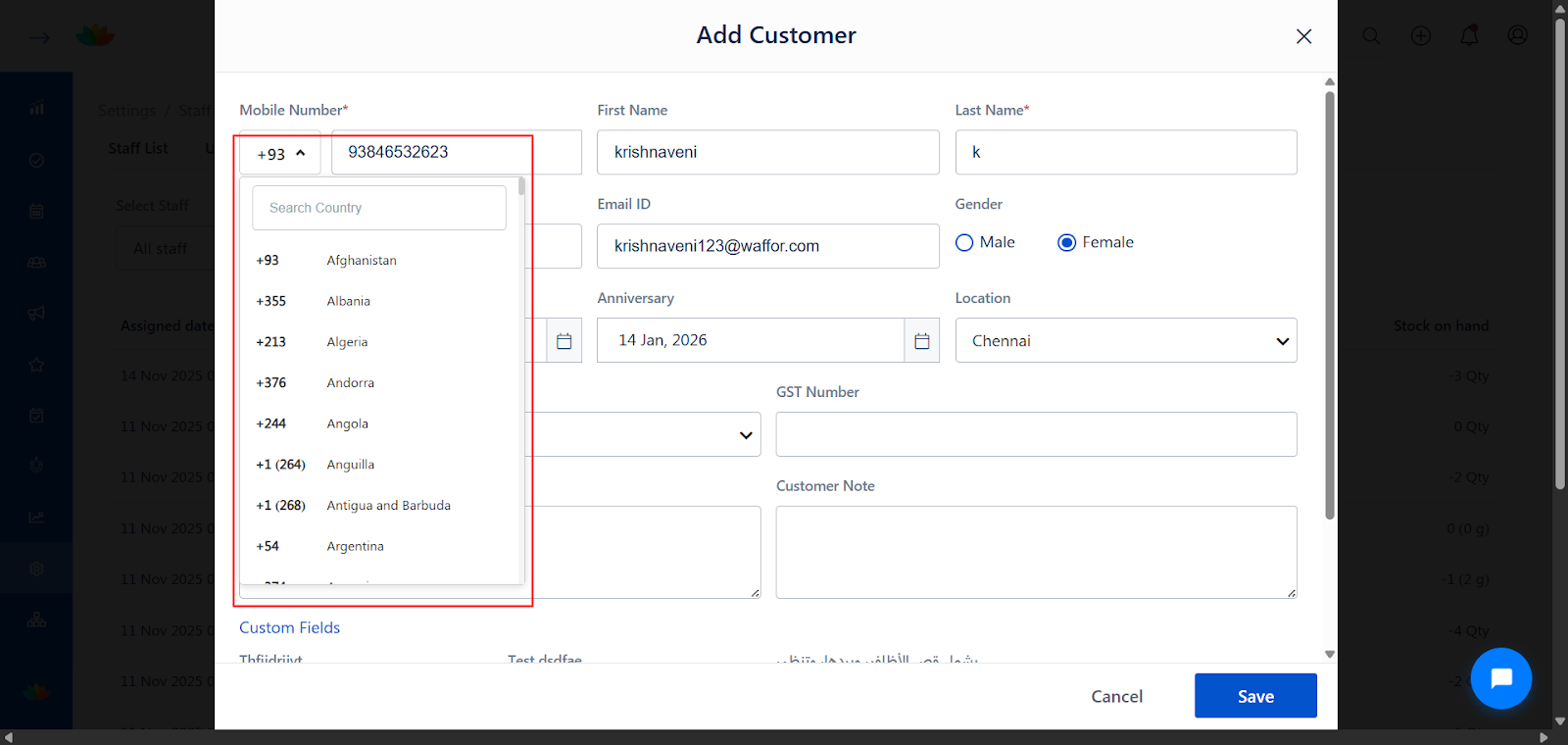
In the Mobile Number field:
Select the required Country Code from the dropdown.
Enter the customer’s mobile number.
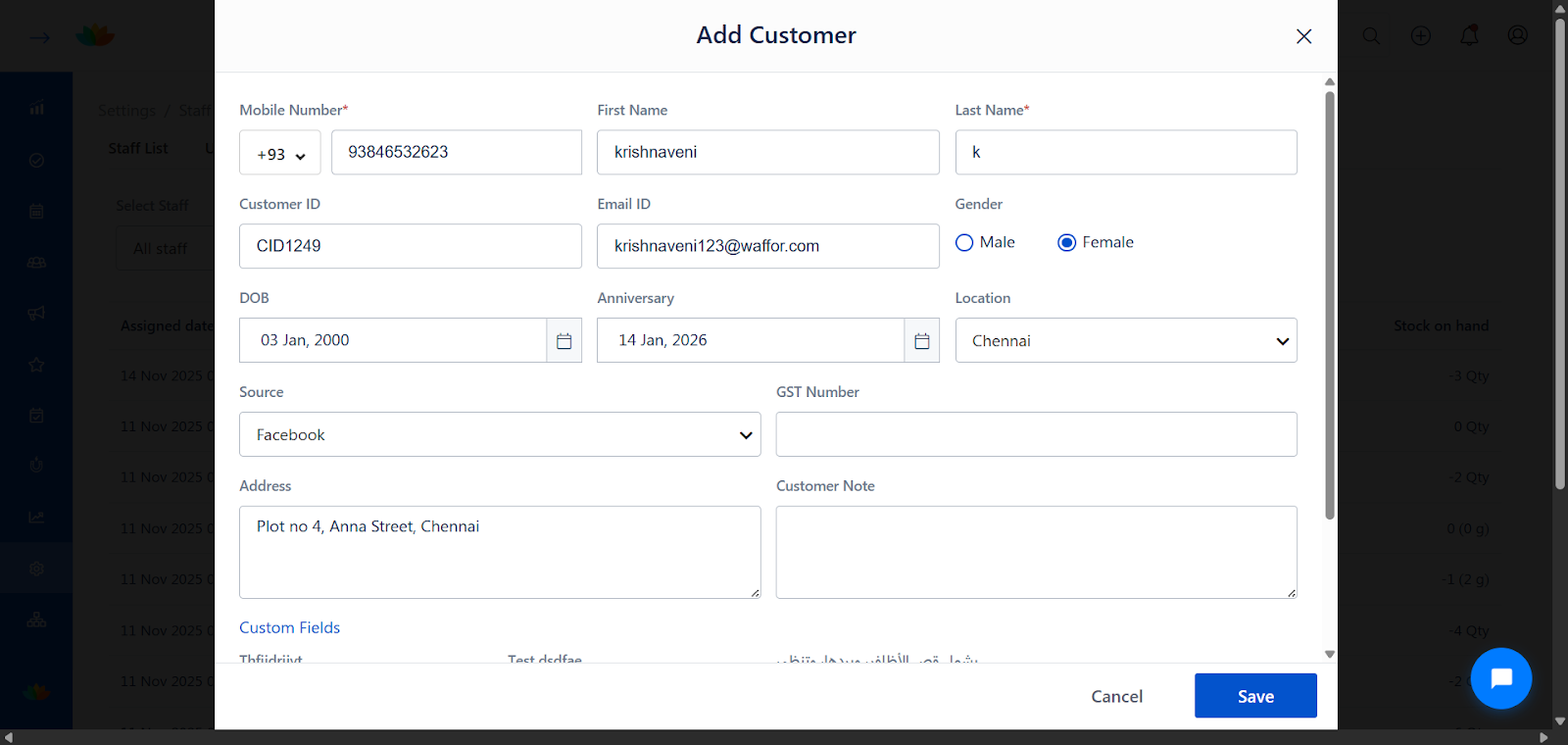
Fill in the remaining customer details such as First Name, Last Name, Email ID, and other optional fields.
Click Save to create the customer.
The customer is successfully created with the selected country code phone number.
Edit an Existing Customer to Add or Change Country Code
Go to Customers.
Search and select the customer you want to edit.
Click Edit.
Update the Country Code and mobile number if required.
Click Save to apply the changes.
The updated country code is reflected across all supported modules.
Smart Customer Search with Country Code Detection
By default, the customer search box uses your account’s base region.
When you select or enter a number with a different country code:
The system automatically updates the country code.
This behavior applies across:
Quick Sale
Appointments
Feedback
Service List Report
Appointment List Report
Sales List Report
Header search bar
Where Country Code Is Now Supported / Displays
The country code field is visible and functional in the following areas:
Customer Management
Add/Edit Customer popups
Customer 360 page
Bookings & Sales
Quick Sale
Appointment page (search and selection)
Header search bar
Module Views
Appointment list page
Reports
Service List, Appointment List, and Sales List
Excel and PDF downloads
Online Booking
“Book Now” popup
Billing
Standard bills
Instant bills
Data Uploads
Customer
Prepaid
Package
Membership
A new Country Code column is available in uploads.
Use standard alphabet codes such as IN, OM, AF.
Use Cases
Businesses serving international or traveling customers
Salons operating in multiple countries or regions
Managing overseas clients for appointments, sales, and memberships
Maintaining a single account while supporting global phone numbers
Benefits
Global Reach: Serve customers from any country without account restrictions.
Operational Flexibility: Add and manage other region customers from a single account.
Improved Data Accuracy: Country code selection ensures correct customer identification.
Consistent Experience: Uniform behavior across bookings, billing, reports, and uploads.
Better Customer Engagement: Continue WhatsApp communication with other region customers.
Important Notes & Limitations
Gift Vouchers:
Country code selection is available in the Add Gift Voucher Recipient popup.
The selected country code is not displayed in the UI (In-app or Online) after saving in this version.
Bulk Invoices:
International country codes are not supported for Bulk Invoice uploads.
Customers created via bulk upload will default to the account’s base region.
Notifications:
For customers with other-region phone numbers:
WhatsApp notifications will be sent.
SMS notifications will not be sent.
List of Country Code
Was this article helpful?
That’s Great!
Thank you for your feedback
Sorry! We couldn't be helpful
Thank you for your feedback
Feedback sent
We appreciate your effort and will try to fix the article